


Vidu - AI Video Generator
4.83.09K Reviews
App Specs
- Version
- 4.1.4
- Updated On
- License
- Free
- Downloads
- 1,000,000+
- Developer
- ShengShu AI HK Limited
- Categories
- Art & Design
- Platform
- Android
Screenshots

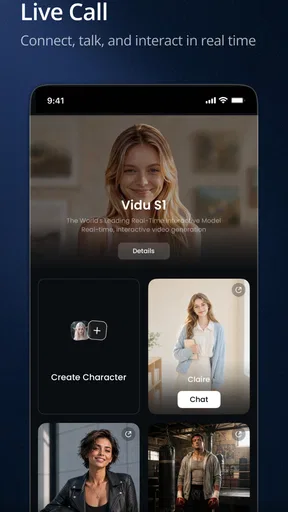
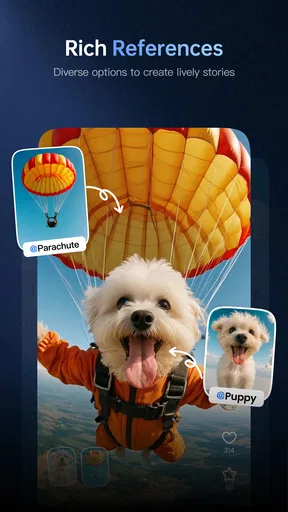
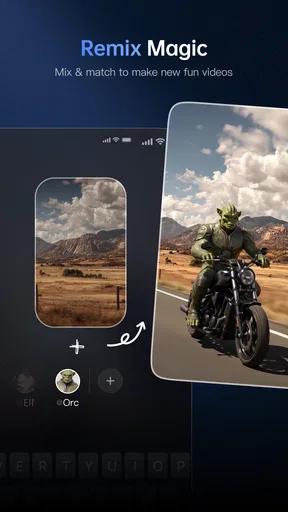
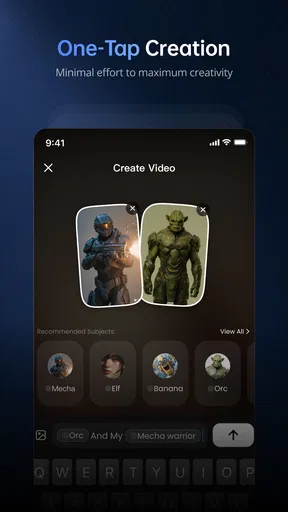
 Analysis by AppCompare
I’m most interested in Vidu when I need a visual starting point quickly, not when I want to control every frame. That distinction matters: an AI video app can help turn a rough concept into something shareable, but it is not automatically a replacement for a careful edit. Vidu - AI Video Generator is an art and design app from ShengShu AI HK Limited, and I’d approach it as a shortcut for trying ideas rather than a guaranteed route to a finished, publication-ready video.
What the price does—and doesn’t—tell you
The app is free to download, with in-app purchases listed from $0.49 to $104.99 per item. That gives you a clear starting point, but not a complete picture of what a particular project will cost: the price range alone doesn’t tell me which purchase suits a given workflow. I’d install it and check the options shown in the app before relying on it for repeated work. Free access is a sensible way to judge the fit; paid value depends on what you actually need.
That distinction is especially useful if you’re choosing between Vidu and a conventional mobile editor. Traditional editors generally put more emphasis on arranging clips and making direct changes yourself; this app’s appeal is the prospect of getting an AI-generated result from an idea with less hands-on editing. If you enjoy shaping timing, transitions, and individual shots, manual editing may suit you better. If the blank timeline is what slows you down, Vidu is more appealing.
Where the time savings can matter
I can see the clearest use for short-form social content: a creator wants to test a concept, a small business needs a visual draft for a post, or someone has a simple explanation that might work better as a video than as a block of text. In those cases, the useful outcome may be a first draft, not a flawless final cut. You can judge the visual direction early and decide whether it deserves more time.
A practical workflow is to begin with one focused idea rather than a long, crowded brief. For example, if I were preparing a quick post about a new product, I’d write one central message and decide what I want a viewer to remember. That gives an AI tool a clearer target and gives me a fairer way to assess the result. If the first version misses the point, I can revise the brief instead of trying to rescue a video built around too many competing ideas.
It may also help to treat generated material as a draft when accuracy matters. A video that looks polished can still communicate the wrong emphasis, so I’d review the result for meaning and tone before sharing it. That is particularly important for a business post, an instructional clip, or anything representing someone else’s work. Speed is valuable, but it doesn’t remove the need for a human check.
Who is likely to get the most from it?
Vidu makes the most sense to me for curious beginners, social creators who need ideas on demand, and people who want to experiment without learning a full editing workflow first. It may also be useful when you’re exploring several visual directions and don’t yet know which one is worth developing. I’d be less enthusiastic about it as the only tool for a project that requires exact shot selection, tight brand control, or repeated fine adjustments.
Worth Reading Before You Choose

EA SPORTS FC Mobile 26 Is a Bigger Football Game, but It Takes Time

Flipboard Shows What News Apps Must Do Beyond the Feed

Switching to Android Auto Means Rethinking Your Driving Routine

Google Calendar Makes a Crowded Week Easier to Manage

Ludo King Makes the Most of the Minutes Between Plans

Baby Panda World Brings Quick Play to Modern Phones, but Its Game Library Feels Busy
If you already enjoy editing, consider whether you want generation or control. A standard video editor is often the better fit when you have footage ready and know precisely how you want it cut. Vidu is more interesting when your starting material is an idea and you want the app to help turn that into a visual draft. Those are different jobs, so the better choice depends less on which app sounds more advanced and more on what is actually slowing you down.
Questions worth settling before a project
One practical question is whether the app suits your device. Vidu’s current version is 3.5.7, and it requires iOS 9 or later. I’d check compatibility before planning a project around it, especially if I were using an older device. The app is rated for Everyone, and its reach—over 500,000 installs alongside a 4.9 average from around 14,000 ratings—suggests that plenty of people are trying it, though those figures can’t tell you whether its style will match your own work.
Another question is whether the result needs to be fully yours, frame by frame. If the answer is yes, I’d plan to inspect and refine the output, or use an editor that gives direct control over the timeline. If the goal is to explore a concept or make a quick social draft, I’d be more comfortable letting AI do some of the initial work. For a recurring workflow, I’d also check the in-app purchase choices before assuming that free access covers every need.
Getting Started with Vidu
Jumping into Vidu - AI Video Generator is a breeze. The setup process is straightforward; you simply download the app, sign up, and you're ready to roll. The user interface is sleek and intuitive, which is a huge plus for those of us who might be a bit technologically challenged. It almost feels like the app holds your hand as you navigate through its features.
Features that Stand Out
Now, onto the exciting part—what can Vidu actually do? The app offers a plethora of features that cater to both beginners and seasoned creators.
- AI-Powered Video Creation
- This is where the magic happens. Vidu uses advanced AI algorithms to help you create videos in minutes. You just input your content, and the AI takes care of the rest. It's like having a professional editor in your pocket!
- Customizable Templates
- Vidu boasts a library of templates that suit different themes and styles. Whether you're crafting a marketing video or a personal vlog, there's a template for you. And yes, you can tweak them to fit your brand perfectly.
- Text-to-Video Functionality
- Got a script? Just paste it into Vidu, choose a template, and watch as your words transform into a dynamic video. It's perfect for making quick explainer videos or turning blog posts into visual content.
User Experience and Performance
Using Vidu feels like a breath of fresh air. The app is responsive, and I didn’t experience any annoying lags or crashes. The AI does a commendable job of understanding your input and delivering a polished final product. I was particularly impressed with how quickly it renders videos, even on my slightly older device.
While the app is generally smooth sailing, I did encounter a couple of hiccups. For one, the AI sometimes struggles with unusual accents in voiceovers. Additionally, while the templates are great, more customization options would be a welcome addition for those who want to add a unique touch.
My verdict on value
For me, the strongest reason to try Vidu is the chance to move from a rough idea to a video draft without first becoming an editor. The free download lowers the barrier to testing that workflow, while the listed purchase range means I’d make a decision about paying only after checking what the app offers for my particular needs. I wouldn’t pay on the assumption that every output will be ready to publish or that a paid option will solve the creative limitations I noticed.
There’s also a useful trade-off in how much direction you give the app. A very broad prompt may leave you with a result that feels generic; a concise brief with one audience, one message, and one intended mood is easier to evaluate. I’d save a version of the brief that produced a promising result, then change just one element at a time when exploring alternatives. That makes it easier to tell whether the change improved the video, rather than starting over with several unknowns.
For a small business owner, an everyday example might be preparing a quick social post between other tasks. I’d draft the main point, use Vidu to explore a visual treatment, then watch the complete result once with the sound on and once with the sound off. The first pass helps catch narration or tone issues; the second shows whether the visuals still make sense on their own. If the message is unclear, I’d simplify the idea rather than assume a more elaborate template will fix it.
I’d skip it when the assignment calls for strict visual consistency, exact pacing, or detailed control over every edit. Those needs favor a conventional editor, where the creator can work directly with clips and make deliberate adjustments. I’d also choose a simpler, established workflow if a deadline leaves no time to review an AI-generated draft. The time saved at the beginning is only useful if there is enough time left to check the result.
Vidu is free to try, but that does not make it automatically the best value for every creator. I’d recommend giving it a look if you want to test AI-assisted video creation and can judge the output before relying on it. If you need dependable frame-by-frame control, or expect a tool to finish a sensitive or highly specific project without your review, I’d choose another approach. Its appeal is strongest as a fast way to explore an idea—and its value is yours to decide after seeing whether that first draft genuinely helps.
Final Thoughts
So, is Vidu worth your time? In my opinion, absolutely. It’s a powerful tool that democratizes video creation, making it accessible to everyone, regardless of skill level. The convenience it offers is unparalleled, and the results speak for themselves. Whether you're a content creator, a marketer, or just someone who loves to dabble in video creation, Vidu is a must-try.
If you're ready to dive into the world of seamless video creation, give Vidu a shot. It's like having a video production studio at your fingertips, and trust me, once you start, you'll wonder how you ever managed without it.
Pros
- Easy to use with intuitive interface.
- Offers a variety of video templates.
- High-quality video output.
- Quick rendering time for videos.
- Supports multiple video formats.
Cons
- Limited free version features.
- Occasional in-app ads.
- Requires stable internet connection.
- Editing tools could be more advanced.
- Subscription can be costly for some.
FAQs for Vidu - AI Video Generator
What is Vidu - AI Video Generator?
Vidu - AI Video Generator is an innovative app designed to help users create high-quality videos using artificial intelligence. It offers a variety of templates, effects, and editing tools, allowing both beginners and professionals to produce polished content quickly and easily. The app is available for both Android and iOS devices.
How does Vidu use AI to generate videos?
Vidu utilizes advanced AI algorithms to streamline the video creation process. The app can automatically edit clips, select transitions, and enhance visuals based on the content provided. Users can input their preferences, and the AI will generate a video that aligns with the desired style and mood, significantly reducing editing time.
Is Vidu suitable for professional video editors?
Yes, Vidu caters to both amateur and professional video editors. While it provides easy-to-use tools for beginners, it also offers advanced features for professionals who require more control and customization. The app includes options for manual adjustments, ensuring that expert users can achieve the precise look and feel they desire.
What are the main features of Vidu?
Vidu features a wide range of tools to enhance video creation. These include a library of customizable templates, AI-driven editing assistance, special effects, text overlays, and audio integration. Additionally, Vidu supports multiple formats and resolutions, making it versatile for different creative needs and platforms.
Is Vidu free to use, or does it require a subscription?
Vidu offers a free version with basic features, allowing users to test its capabilities. However, to access premium features such as advanced templates and effects, a subscription is required. The subscription model offers various plans to fit different needs, providing flexibility for users who want to unlock all available tools.


